

Hello JLexArt Support Team,
While testing JLex Comment 3.8.2 on Joomla 6.2, I encountered two issues with the emoji picker. I managed to resolve both locally and would like to share my findings in case they are useful for a future update.
1. Inconsistent emoji rendering in the emoji picker
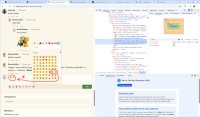
The emoji picker displays emoji as Unicode characters inside `<button class="emoji">` elements. Their appearance therefore depends on the fonts available in the user's operating system and browser.
As a result, some emoji appear in color while others appear as monochrome symbols. Specifying emoji fonts such as Segoe UI Emoji, Apple Color Emoji, or Noto Color Emoji through CSS does not fully resolve this inconsistency.
However, once inserted into the comment editor, emoji are rendered as images using Twemoji 15.1.0. This produces a consistent appearance regardless of the user's operating system.
I noticed that `assets/script.js` already contains an attempt to apply Twemoji to the emoji picker:
However, this runs only once, while the picker content is loaded asynchronously and can be updated when switching categories or searching.
My workaround: I added a small JavaScript extension using `MutationObserver` to detect newly created emoji buttons and replace their Unicode text with the corresponding Twemoji PNG images.
This works well and provides consistent emoji rendering in both the picker and the comment editor.
Suggested improvement: Render the emoji picker using Twemoji images directly, or ensure that `twemoji.parse()` is called whenever the picker content is populated or updated.
2. Incorrect Unicode sequences in emojis.json
The second issue concerns compound emoji consisting of multiple Unicode code points, particularly family, couple, and relationship emoji.
Some entries in:
`components/com_jlexcomment/assets/emojis.json`
contain an incomplete sequence in the `unicode` property, while the correct sequence is already available in `unicode_alt`.
For example, the emoji representing a couple (woman, woman) contains:
When inserted into the comment editor, JLex Comment uses the incomplete `unicode` value to construct the Twemoji image URL:
`.../assets/72x72/1f469-2764-1f469.png`
This image does not exist, resulting in a broken image icon followed by the emoji's alternative text.
The correct Twemoji image filename is:
`1f469-200d-2764-fe0f-200d-1f469.png`
The missing `200d` code points are Zero Width Joiners (ZWJ), which combine individual characters into a single emoji. The `fe0f` code point specifies emoji presentation.
My workaround: I wrote a Python script that updates the affected entries in `emojis.json`, replacing the incomplete `unicode` values with their corresponding `unicode_alt` sequences. I also updated the related `hex`, `char`, and `code_decimal` properties.
I found 19 affected entries containing incomplete compound sequences. After correcting them, the previously broken emoji images load successfully.
Suggested improvement: Review the Unicode sequences in `emojis.json` and ensure that compound emoji use the complete sequences required by Twemoji, including ZWJ and variation selectors where necessary.
Conclusion
Both issues are now resolved in my local installation:
- The emoji picker uses the same Twemoji graphics as the comment editor.
- Compound emoji are inserted and displayed correctly without broken images.
I hope these findings help improve future releases of JLex Comment. Thank you for developing and maintaining this extension!
Best regards
While testing JLex Comment 3.8.2 on Joomla 6.2, I encountered two issues with the emoji picker. I managed to resolve both locally and would like to share my findings in case they are useful for a future update.
1. Inconsistent emoji rendering in the emoji picker
The emoji picker displays emoji as Unicode characters inside `<button class="emoji">` elements. Their appearance therefore depends on the fonts available in the user's operating system and browser.
As a result, some emoji appear in color while others appear as monochrome symbols. Specifying emoji fonts such as Segoe UI Emoji, Apple Color Emoji, or Noto Color Emoji through CSS does not fully resolve this inconsistency.
However, once inserted into the comment editor, emoji are rendered as images using Twemoji 15.1.0. This produces a consistent appearance regardless of the user's operating system.
I noticed that `assets/script.js` already contains an attempt to apply Twemoji to the emoji picker:
setTimeout(function(){

    if(typeof twemoji=='object')

        twemoji.parse($('#jcm-emoji')[0], {className:"ej"});

}, 1000);
However, this runs only once, while the picker content is loaded asynchronously and can be updated when switching categories or searching.
My workaround: I added a small JavaScript extension using `MutationObserver` to detect newly created emoji buttons and replace their Unicode text with the corresponding Twemoji PNG images.
This works well and provides consistent emoji rendering in both the picker and the comment editor.
Suggested improvement: Render the emoji picker using Twemoji images directly, or ensure that `twemoji.parse()` is called whenever the picker content is populated or updated.
2. Incorrect Unicode sequences in emojis.json
The second issue concerns compound emoji consisting of multiple Unicode code points, particularly family, couple, and relationship emoji.
Some entries in:
`components/com_jlexcomment/assets/emojis.json`
contain an incomplete sequence in the `unicode` property, while the correct sequence is already available in `unicode_alt`.
For example, the emoji representing a couple (woman, woman) contains:
"unicode": "1f469-2764-1f469",

"unicode_alt": "1f469-200d-2764-fe0f-200d-1f469"
When inserted into the comment editor, JLex Comment uses the incomplete `unicode` value to construct the Twemoji image URL:
`.../assets/72x72/1f469-2764-1f469.png`
This image does not exist, resulting in a broken image icon followed by the emoji's alternative text.
The correct Twemoji image filename is:
`1f469-200d-2764-fe0f-200d-1f469.png`
The missing `200d` code points are Zero Width Joiners (ZWJ), which combine individual characters into a single emoji. The `fe0f` code point specifies emoji presentation.
My workaround: I wrote a Python script that updates the affected entries in `emojis.json`, replacing the incomplete `unicode` values with their corresponding `unicode_alt` sequences. I also updated the related `hex`, `char`, and `code_decimal` properties.
I found 19 affected entries containing incomplete compound sequences. After correcting them, the previously broken emoji images load successfully.
Suggested improvement: Review the Unicode sequences in `emojis.json` and ensure that compound emoji use the complete sequences required by Twemoji, including ZWJ and variation selectors where necessary.
Conclusion
Both issues are now resolved in my local installation:
- The emoji picker uses the same Twemoji graphics as the comment editor.
- Compound emoji are inserted and displayed correctly without broken images.
I hope these findings help improve future releases of JLex Comment. Thank you for developing and maintaining this extension!
Best regards