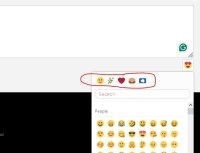


Hello, in text field when writing a review, if you want to put an emoticon (smiley) its selection is counter-intuitive.
All our customers are blocked when they click on the first row of emoticons, they wait for emoticon to be showed in the text, but this is only an emoticon type selector, you must click on the emoticon below, under the search bar and only in this case it will be shown in the text.
Is it possible to make first row of emoticon types black and white (like in whatsapp) or just hide them?
Do we really need a search bar under emoticon types ? Is it possible to hide the search bar? Just to keep this feature as simple as possible.
Best reagrds.
All our customers are blocked when they click on the first row of emoticons, they wait for emoticon to be showed in the text, but this is only an emoticon type selector, you must click on the emoticon below, under the search bar and only in this case it will be shown in the text.
Is it possible to make first row of emoticon types black and white (like in whatsapp) or just hide them?
Do we really need a search bar under emoticon types ? Is it possible to hide the search bar? Just to keep this feature as simple as possible.
Best reagrds.