Hello! We are online right now 12:23:20

The support team is online and will be able to answer your inquiries. Please stay calm, follow the rules and do not cross post. We'll attend to you as soon as we can.

Official support hours are from 8:30AM — 5:00PM Monday to Saturday (GMT +7)

Release JLex Comment 3.6.1 👏

Small images maximally enlarged and blurred / Length of intro text

Stefan
Hi there, I love your extension!

I have 4 questions:

  1. How to change the date format to dd.mm.YY (dots instead of slash)?
  2. Images are automatically enlarged to the maximum even if it is only a small image (then blurred, see attachment). Where can I turn this off resp. set the image size?
  3. Where can I set the length of the introduction text?  Or can I display just everything by default?
  4. Where are the images / media stored on the server?
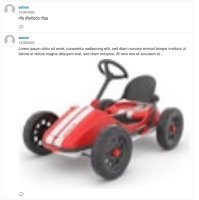
attachment.jpg 271.13 K

5 replies

Victor
Yes, I will add it ;).

Best regards,
Victor Nguyen.
@Stefan is wrote at 2022-06-17 14:51:53
You'll add it? That is great! :) Just sent you a cup of coffee.
Victor
Thank you! Follow your questions:
1. How to change the date format to dd.mm.YY (dots instead of slash)?
=> Currently it does not support this format.

2. Images are automatically enlarged to the maximum even if it is only a small image (then blurred, see attachment). Where can I turn this off resp. set the image size?
=> A few CSS errors caused it to not display its original size.

[1+2] It's not too difficult to add it, if you need it urgently, I'll add it for you. Otherwise, you can wait for the updated version this month.

3. Where can I set the length of the introduction text?  Or can I display just everything by default?
=> By default, it will use the first paragraph to use for introduction text.

4. Where are the images / media stored on the server?

=> All images (original + its resize) / media stored in folder media/jgb

Hope can help you!

Best regards,
Victor Nguyen.
Stefan
Thank you very much, Victor. Excellent support! :)
No hurry, I'll just wait for the next version.

I would have one more suggestion:
In my opinion, the comment icon should be displayed only if there are actually comments (along with the number). Currently the icon is always shown when comments are enabled.

Best regards, Stefan
@Victor is wrote at 2022-06-13 13:33:58
Thank you! Follow your questions: [i]1. How to change the date format to dd.mm.YY (dots instead of slash)?[/i] => Currently it does not support this format. [i]2. Images are automatically enlarged to the maximum even if it is only a small image (then blurred, see attachment). Where can I turn this off resp. set the image size?[/i] => A few CSS errors caused it to not display its original size. [1+2] It's not too difficult to add it, if you need it urgently, I'll add it for you. Otherwise, you can wait for the updated version this month. [i]3. Where can I set the length of the introduction text?  Or can I display just everything by default?[/i] => By default, it will use the first paragraph to use for introduction text. [i]4. Where are the images / media stored on the server?[/i] => All images (original + its resize) / media stored in folder [b]media/jgb[/b] Hope can help you! Best regards, Victor Nguyen.
Victor
Thank you, Stefan.

In my opinion, the comment icon should be displayed only if there are actually comments (along with the number). Currently the icon is always shown when comments are enabled.
=> Yes, I will add an option :D.

Best regards,
Victor Nguyen.
@Stefan is wrote at 2022-06-13 13:59:10
Thank you very much, Victor. Excellent support! :) No hurry, I'll just wait for the next version. [i]I would have one more suggestion: [/i] In my opinion, the comment icon should be displayed only if there are actually comments (along with the number). Currently the icon is always shown when comments are enabled. Best regards, Stefan
Stefan
You'll add it? That is great! :)
Just sent you a cup of coffee.

@Victor is wrote at 2022-06-15 13:25:55
Thank you, Stefan. [i]In my opinion, the comment icon should be displayed only if there are actually comments (along with the number). Currently the icon is always shown when comments are enabled.[/i] => Yes, I will add an option :D. Best regards, Victor Nguyen.
Reply to

Product Changelogs

Product Changelogs

JLex Comment 3.6.1
^ Integrate the Finder (Smart search) plugin.
# Fixed login with Facebook.
# Fixed the issue of being unable to retrieve a user's profile picture on Facebook.
# Fixed a bug related to editing comments in the front-end.
# Fixed bug "Jump to comment is broken".
# Improved the data structure.
JLex Block 6.1.7
# Fixed known bugs.
# Updated GEO servers.
JLex Review 6.4.1
# Improved template.
# Fixed missing translation errors.
# Fixed field data type errors.
# Fixed known minor bugs.
Youtube Feed Pro 6.0.5
# Fixes the issue of thumbnails not loading.
JLex Review 6.3.7
^ Integrated Finder plugin.
# Fixed known bugs.
Youtube Feed Pro 6.0.4
# Redesign themes
# Optimize source code (reduce 35%)
# Optimize processing time
# Dark Mode in the admin section
# Support for changing thumbnail size.
# Compatible with Joomla 5.4.x and 6.
Flash Sale Banner 1.1.2
# Compatible with Joomla 5.4.x and 6.
See more
✨ All extensions are now fully compatible with Joomla 5.4.x and 6.
Sign in to your account

Use your social accounts to sign in