Zen mode 05:39:12

It is currently our zen mode where we get some rest so that we can come back to work feeling refreshed the next day and assist you with your issues. Some answers may already be available on our documentation.

Official support hours are from 8:30AM — 5:00PM Monday to Saturday (GMT +7)

Release JLex Review v6.6.2

Small images maximally enlarged and blurred / Length of intro text

Stefan
Hi there, I love your extension!

I have 4 questions:

  1. How to change the date format to dd.mm.YY (dots instead of slash)?
  2. Images are automatically enlarged to the maximum even if it is only a small image (then blurred, see attachment). Where can I turn this off resp. set the image size?
  3. Where can I set the length of the introduction text?  Or can I display just everything by default?
  4. Where are the images / media stored on the server?
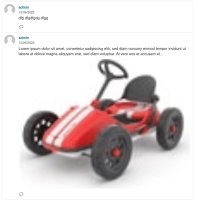
attachment.jpg 271.13 K

5 replies

Victor
Thank you! Follow your questions:
1. How to change the date format to dd.mm.YY (dots instead of slash)?
=> Currently it does not support this format.

2. Images are automatically enlarged to the maximum even if it is only a small image (then blurred, see attachment). Where can I turn this off resp. set the image size?
=> A few CSS errors caused it to not display its original size.

[1+2] It's not too difficult to add it, if you need it urgently, I'll add it for you. Otherwise, you can wait for the updated version this month.

3. Where can I set the length of the introduction text?  Or can I display just everything by default?
=> By default, it will use the first paragraph to use for introduction text.

4. Where are the images / media stored on the server?

=> All images (original + its resize) / media stored in folder media/jgb

Hope can help you!

Best regards,
Victor Nguyen.
Stefan
Thank you very much, Victor. Excellent support! :)
No hurry, I'll just wait for the next version.

I would have one more suggestion:
In my opinion, the comment icon should be displayed only if there are actually comments (along with the number). Currently the icon is always shown when comments are enabled.

Best regards, Stefan
@Victor is wrote at 2022-06-13 13:33:58
Thank you! Follow your questions: [i]1. How to change the date format to dd.mm.YY (dots instead of slash)?[/i] => Currently it does not support this format. [i]2. Images are automatically enlarged to the maximum even if it is only a small image (then blurred, see attachment). Where can I turn this off resp. set the image size?[/i] => A few CSS errors caused it to not display its original size. [1+2] It's not too difficult to add it, if you need it urgently, I'll add it for you. Otherwise, you can wait for the updated version this month. [i]3. Where can I set the length of the introduction text?  Or can I display just everything by default?[/i] => By default, it will use the first paragraph to use for introduction text. [i]4. Where are the images / media stored on the server?[/i] => All images (original + its resize) / media stored in folder [b]media/jgb[/b] Hope can help you! Best regards, Victor Nguyen.
Victor
Thank you, Stefan.

In my opinion, the comment icon should be displayed only if there are actually comments (along with the number). Currently the icon is always shown when comments are enabled.
=> Yes, I will add an option :D.

Best regards,
Victor Nguyen.
@Stefan is wrote at 2022-06-13 13:59:10
Thank you very much, Victor. Excellent support! :) No hurry, I'll just wait for the next version. [i]I would have one more suggestion: [/i] In my opinion, the comment icon should be displayed only if there are actually comments (along with the number). Currently the icon is always shown when comments are enabled. Best regards, Stefan
Stefan
You'll add it? That is great! :)
Just sent you a cup of coffee.

@Victor is wrote at 2022-06-15 13:25:55
Thank you, Stefan. [i]In my opinion, the comment icon should be displayed only if there are actually comments (along with the number). Currently the icon is always shown when comments are enabled.[/i] => Yes, I will add an option :D. Best regards, Victor Nguyen.
Victor
Yes, I will add it ;).

Best regards,
Victor Nguyen.
@Stefan is wrote at 2022-06-17 14:51:53
You'll add it? That is great! :) Just sent you a cup of coffee.
Reply to

Product Changelogs

JLex Review 6.6.2
^ Content suggestion feature: Adding pre-existing content helps users write reviews more quickly. (To find out more, go to: Configuration > Review Form > Default > Suggested phrases)
^ Display review content directly within the management list.
^ For video files: Watch directly instead of downloading.
# Fixed known bugs.
JLex Comment 3.8.2
^ Support for CAPTCHA challenges on subscriber forms.
# Fix email sending issues.
JLex Comment 3.7.7
# IMPORTANT: Fixed a security issue: Anyone could delete comments.
# This version includes fixes to ensure proper functionality on Joomla 3.
JLex Block 6.2.6
# Upgrade the framework to be compatible with Joomla 6.1.x
# End of support for Joomla 3.
JLex Comment 3.7.5
# Fixed an issue where the comments section would not display when "Script Position" was set to "Head Tag" or "Body Tag" on certain browsers.
Youtube Feed Pro 6.0.7
^ Added a background color option for the playlist.
# Fixed issues for compatibility with Joomla 6.1.4.
JLex Transfer 1.7.1
^ Filter articles by the selected time range.
^ Added a "resume migration" feature for cases of interruption.
^ Added advanced options for the category.
# Improve user interface
# Optimize the data importing.
# Fixed known issues
✨ All extensions are now fully compatible with Joomla 5.4.x and 6.
Sign in to your account

Use your social accounts to sign in